اللي ما شاف برنامج خواطر هالسنة يشوفه

YousefEducation, General, Islamiyat, Life Leave a Comment

تعودنا في كل سنة متابعة البرامج المفيدة في رمضان ومن اكثر تلك البرامج فائدة برنامج خواطر للأستاذ احمد الشقيري وما يحمله من محتوى علمي و اخلاقي ننتفع منه بإذن الله تعالى

والذي يتابع البرنامج يلاحظ التطور التكنلوجي في الجرافكس والانميشن التي يستعملها الشقيري لتوضيح بعض المفاهيم نظريا واحب ان اشكر القائمين على البرنامج لهذا التطور الملحوظ و ادراج كل الحلقات على صفحة اليوتيوب بالجودة العالية اسأل الله تعالى ان يوفقهم..


وهذه واحدة من الحلقات المهمة بنظري التي تتكلم عن الحرية المالية و تكلمت عن ربط العملات بالذهب و بعض المفاهيم البسيطة عن الاستثمار والعوائد من الاستثمار

http://youtu.be/ad4G4vX_PSk

وهذا هو رابط خواطر 10 من القناة الرسمية (ارام) 

خواطر 10


The Ultimate Password Manager for Windows, Mac, iOs and Android

YousefApplications, Computers, Internet, Review, Service, Technology Leave a Comment

1Password – No More Sticky Notes from AgileBits on Vimeo.


I’ve been using 1Password password manager for saving my passwords for more than 3 years now, can’t live without it! (Technically I can but will reset a lot of my passwords and will refer to a lot of emails to remember my login credentials for different sites.)

Today a lot of us have at least 3 emails, 1 instagram account, 1 twitter account, Amazon, ebay, 2 Bank Accounts, Work login account and the list goes on. It’s just so many emails and logins and you will forget one sooner or later. I use 1password, both on my windows devices and my Macbook Air and android and iOs (it’s not as good on Android as it is on iOs! – but the windows version is perfectly fine!)

Basically, you can save your current passwords on your computer (in a local encrypted file) or store that encrypted file on storage platforms such as dropbox and access to that through different devices and platforms.

1 password Browser Plugin 1 Password

You then install browser plugins that will automatically capture login data or that can generate credentials for you based on the level of difficulty that you choose and voila! The only downside of generated passwords is that you will need one password to logon, and it won’t be via memory as the password would be as complex as can be.

Where to find it ? 

https://agilebits.com/store


Which Version to Choose ?

which1PasswordToChoose

I would personally recommend buying the 1Password Mac + Windows bundle if you use multiple platforms, it’s just $20 more but whenever you choose to change your OS, you will have your trusted application to use with you at no additional cost.

I highly recommend using it, and would be glad to answer any of your questions about it here!


DJI Phantom وسط العاب نارية

YousefGeneral, Internet, Technology, Uncategorized Leave a Comment

قام احد الاشخاص بتحليق طائرته الفاتوم اثkاء عرض للاعاب النارية في احتفالية الاستقلال الامريكية في امريكا و كان التصور مذهلا جدا

I-Static Tablet Stand Review

YousefAccessories, Internet, Product, Review, Technology Leave a Comment

Yesterday Blink.com.kw had a 1 day offer with more than a 50% discount on a Tablet stand. I wanted one but 25 KD was a little too much and it was offered for 9 KD yesterday, so I didn’t hesitate and directly went and bought one.


Blink Istatic Stand

Best use for this stand for me is during prayer as I can have the Quraan on my ipad and be able to read from it while praying also to have your ipad next to your bed and charging at the same time, so its great for watching a movie.

Istatic Stand


Its not 100% stable due to the flexible nature of the extension arm which you can move up and down as you desire, but for the ipad mini it held it up pretty good and was stable enough, and the charger slot is another advantage which for me completes this stand, you simply connect your current charger via an extension USB provided and connect your tablet via a USB cable on a higher slot.


Istatic Stand

UltraText the cool new thing for instagram ?

YousefAnnouncement, Applications, Internet, Review Leave a Comment

I was reading around tonight and I found a couple of posts on the application called UltraText, basically its an application that allows you to create animated GIFs with photos, you can get some cool instagram videos and GIFs you can share with your whatsapp and iMessage friends


Give it a try and share some cool animated videos with us!

You can find Ultratext on the app store here.

10 خواطر

YousefEducation, General, Islamiyat, Life Leave a Comment

تعودت في كل سنه ان اتابع برنامج “خواطر” لأحمد الشقيري ولكني لم احظى بالوقت لمشاهدته هذه السنة الى الان.. ولكنني قررت ان استثمر وقت الازدحام (اذا كان الشارع واقفا تماما و باستخدام البلوتوث لمخارج الصوت و تثبت الهاتف) لمشاهد الحلقات والاستفادة منها ان شاء الله..

httpv://www.youtube.com/watch?v=Mviizt7AHHI&list=PLM7DHPAGxHOG-oW-M-rLEn_eXDGX9qLnE&feature=share

و بامكانكم زيارة صفحة الشقيري على اليوتيوب في الرابط التالي لايجاد الحلقات وهي ايضا مترجمه لكي ننشرها لغير الناطقين باللغة العربية..

http://www.youtube.com/user/AhmadAlShugairi

اتمنى لكم الاستفادة و تقبل الله طاعتكم..

Review: Cable Matters Mini Display Port to HDMI, VGA and DVI Adapter

YousefAccessories, Apple, Computers, Education, Product, Review, Technology Leave a Comment

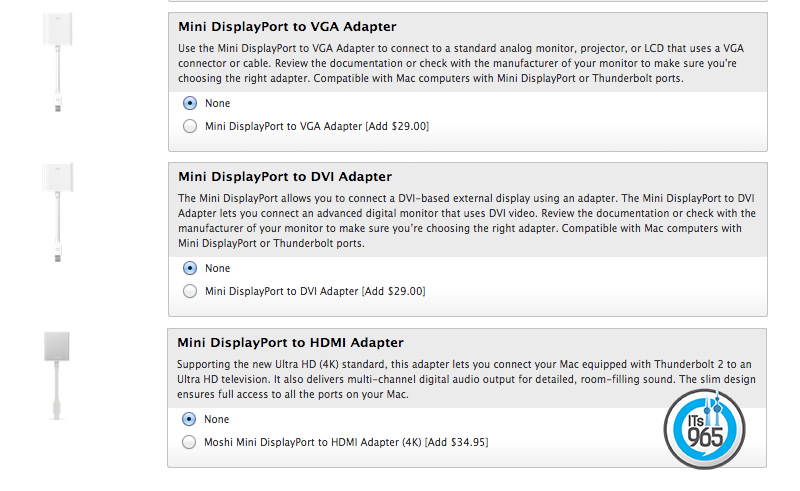
Yesterday I received my MacBook Air, as well as an adapter I ordered from Amazon which is basically a 3 in 1 Thunderbolt to VGA, DVI or HDMI (with sound output for HDMI), the Macbook Air doesn’t come with an output port, and there’s no way to connect it to a screen without using an adapter. Now apple sell these adapters at $29 each, as well as $34 after market HDMI connector, that means in order for you to buy them all together you will be paying  around $93 in total.

Apple Macbook Air Screen AdapterThe Cable Matters, Mini DisplayPort to HDMI DVI VGA is just the adapter you need to get all three in one device:

Apple Macbook Air Screen Adapter

I was sceptical at first, as it came with a Surreal price tag of $25.99, which was great value for money, I highly recommend investing in one if you own a Mac, just ensure that you select the correct adapter size in comparison to your laptop. For the HDMI output, to enable the sound, simply choose the TV/Screen as the output device, and voila!

Usability : 10/10

Size : 8/10 (A little bulky – but a must I guess)

Quality: 8/10 (Plastic quality could have been better, so that It would be closer to original apple products)

[shashin type=”photo” id=”247,246,245″ size=”small” columns=”3″ order=”user” position=”center” crop=”y”]

You can find it on Amazon here.


Time for a little mobility with the Macbook Air

YousefApple, Blogging, Computers, Technology Leave a Comment

I am what you can call somewhat of a Geek when it comes to technology, and computers in general. I have to have the best specs possible on the device that i’m using, which for my daily uses isn’t really a necessity.

I have a gaming home built pc at home and a really heavy 17″ gaming laptop (the MSI Dragon 2). The specs on the MSI are incredible, but the thing is, the PC + its charger weigh more than 6 KGs. Thats too much especially that I carry it with me wherever I go, and take it with me to work daily!

I decided that I had to change and get something a lot lighter as it was becoming a little bit of a hassle carrying it with me everyday + i get to feel like i’m really abusing it carrying it around on my shoulders everyday as 1. there isn’t much of a variety of bags that offer enough protection for the laptop, and 2. Its too big anyway and I do tend to knock it around a little.

Let me show you a comparison of before and after the change :

Here’s the top view of the difference between the Macbook air and MSI dragon 2  :

MSI Dragon 2 VS Macbook Air


Heres the funny part, the side view, the macbook air is as thick as the MSI’s screen alone!

MSI Dragon 2 VS Macbook Air

20140708_013307

MSI Dragon 2 VS Macbook Air 2

I know performance wise I wouldn’t get even close to the MSI dragon, but for blogging on the go, reviewing my files, simple photo editing, the macbook air is more than enough! My last apple was a 2004 Macbook (it was the black one) it costs more than a lot of laptops that are currently in the market today, but i really liked it back then, then i switched to windows 7 with the Alienware M14x, great laptop too, then the MSI and now to be complemented with the macbook Air – (not replaced).

I’ll be using it and i’ll write back my updates within a week 😀

For all you mac users out there.. What are the applications you cannot live without and recommend I install on my MB Air ?