A Passion for Chocolate and Tasteful DPs (Display Photos)

Dudechocoholics, Food, General, Social Media 2 Comments

Starting out in 2007 with only 139 KD, a passion for chocolate and a BlackBerry handset, Rakan AlFadhala and three of his cousins attempted to turn their homemade molten cakes into a business.

How did they get word out on their molten cakes, well, BBM was mainstream, everyone had a Blackberry and at least 100 Contacts. Here’s what Rakan had to say about using BBM in their Business:

“Let’s face it, we’re all hooked on BBM and we had already been contacting friends and family via BBM to keep them updated on our new business. We started by changing our BBM display pictures to photos of our signature molten cakes, and our status to our slogan, ‘when deliciousness speaks chocolate’. Our contacts then started sharing our messages and pin with others.  BBM was free and all we could afford,”

Thats not all…

For Chocolateness, competitions help drive awareness about products and increases footfalls at the store. “We simply blast out a series of questions to our contacts and whoever is the first to answer correctly would win a dozen of our signature chocolate molten cakes delivered right to their doorstep. The response over BBM has been astounding!”

The Chocolateness team started off with approximately 1000 contacts. Two years later, they now have over 12,000 customers registered for their home delivery service.

Way To Guys! Allah ewafegkoum!

Yummy:

To Order from Chocolateness call them on: +965-22960606

Or Visit: www.chocolateness.net


How to stop Lightroom from Auto-starting when connecting storage media to your Computer

DudeTechnology, Tutorials Leave a Comment

I’ve been annoyed from Lightroom starting up every time I insert a flash drive into my computer.  Apparently the fix was simple and only took 3 mins, including the time I needed to find the solution online. 

All you need to do is :

  1. Go to lightroom. 
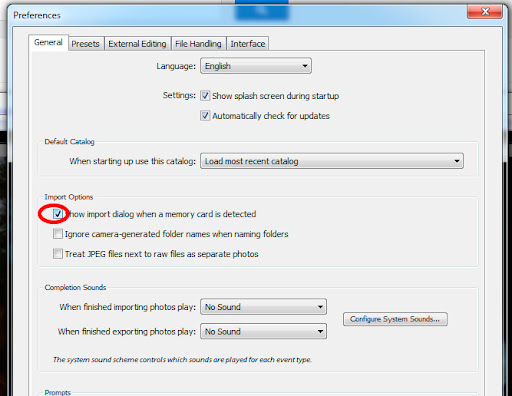
  2. Click on Edit -> Preferences -> General Tab
  3. Un-select “Show Import Dialog when a memory card is detected”

and thats it! You’ll no longer be harassed from Lightroom Every time you enter a memory card or connect your phone to charge on your computer.

The Technical Side of Blogging – Part 3 : Make Your Blog Load Faster

DudeBloggers, General, Technology, Tutorials 2 Comments

Making your site load faster is one of the key things you should focus on! Visitors hate sites that take forever to load, and site ranking engines take the load time into consideration when ranking the website overall.

Lets get to it:

1. Remove, disable, uninstall unwanted/unnecessary plugins:

Some plugins require so much data to be fetched from the database that they make the site load time double or even triple. Try to reduce using plugins that will query the database all the time.

2. Use Caching

Caching speeds up the load time, by having parts of your website stored on visitor’s computers. I’d recommend W3 Total Cache, its simple and straight forward and you can find how to set it up with a simple search.

3. Don’t use too many videos on your blog posts.

Although the file might not be stored on your web server, usually video files will load with websites within iframes. I.e. when the page loads, also the video will load, even though not watched.

4. Use CDN’s (Content Delivery Networks)

What are they? Well in easy terms, CDNs replicate your images and files and allow you to point to the replicas in order to load your site from many different servers, thus allowing many simultaneous connections to load the site. We currently use AWS (from Amazon) and that allowed us to be able to load images from up to 8 different servers, minimizing the loading time and allowing for faster downloading of all our website’s content.

Show-off Your creativity!

DudeEvents Leave a Comment

Would you like to Win 2 VIP Access Tickets to Red Bull Flugtag Event on October 19, 2012 in Kuwait ?

Here’s  what you have to do :

Take a picture or create a design which must contain “MINI” and “Red Bull” and send it to socialmedia@aas.com.kw with the following details:

  • Your Full Name.
  • Phone Number.

The picture or design will be uploaded on the Facebook Page – http://facebook.com/AliAlghanimSons. The top THREE pictures or designs with the most “Likes” will win!

For Sample images and more information make sure to check out : http://www.aas.com.kw/contest/


A Compact Camera I just Might Buy!

DudePhotography Leave a Comment

Sometimes its just not worth it to carry around your DSLR and take it with you to events or small things like going to the arcades with your children or when you’re going out casually. Especially that camera phones don’t have a fast enough shutter speed and most of the photographs you take will be either shaken or too dark. 

One thing caught my eye when I was reading around this morning was the Samsung Ex2f. A new prosumer point and Shoot camera that offers quite a lot that will most probably solve my problem when trying to shoot in Arcades using real lights and no flash!

http://youtu.be/uCzNqFY1FAI

Here’s a creative ad made on the Ex2F.

http://youtu.be/-BOSV6OaPZg

You can find it here at aound $450 in Amazon

The FitBit Ultra

Dudefitness, Health Leave a Comment

http://youtu.be/gA2xEH2C7Fg

I received my FitBit Ultra a couple of days ago from Borderlinx. Here are a couple of advantages of the FitBit over the Nike Fuel Band:

  • I find the FitBit ultra a little more accurate
  • The sleeping meter and wireless Syncing give it a little more functionality and its nice to know nearly how much time it takes for you to get to sleep and how good your sleep was the night before. It syncs automatically with your laptop when you’re near and doesn’t require any user intervention. 

As you can see above, I didn’t have very good sleep last night :'( . 

  • The fact that you can have it in your pocket means that when you’re on the treadmill it will count your steps, unlike the Nike Fuel Band, where if your hands are stationary it wont count your steps + you can put it in your pocket, and be able to wear a watch. 
  • The online information is a lot more accurate and contains a lot more information
  • It can measure stair steps.

If you’re not in a hurry I’d suggest you wait for the newer FitBit model which will be released on the 25th of October, the FitBit One. 

Here’s a comparison video I found , it shows some of the major differences too:

http://cnettv.cnet.com/prizefight-get-summer-bod-tech/9742-1_53-50123866.html


Delete All those old photos on your iPhone!

DudeInternet, Photography, Technology, Tutorials 2 Comments

I was looking around for  a way to delete all the photos on my iPhone, its no longer my primary phone, since I now use the HTC One X. However, wanting to try out the new iOS 6 I decided to clear out all the photos that i have (backing them up first) and then deleting everything.

It’s not so clear as select all and delete (on the iPhone that is) however I found 2 cool options online and wanted to share them with you:

Delete All Photos from iPhone Using Windows PC

This should work in all versions of Windows:

  1. Connect the iPhone to the computer via USB
  2. Open ‘My Computer’ and choose “Apple iPhone”
  3. Open to folders “Internal Storage” and then open “DCIM”, contained within will be a folder containing all photos and videos on the iPhone
  4. From the folder containing the pictures, select all, then delete

Removing pictures from the iPhone this way through Windows is significantly faster than it is from Mac OS X, probably because Windows treats it like a file system rather than a photo manager.”

 Deleting all photos on the iphone using a Mac:

“Just found a much easier way using ‘preview’ with mac. Plug your iphone into the USB, Go to Preview/File/Import Image, and your phone should pop up. Select all photos with Command+A, or pick individual photos to delete.

Then in Preview, click edit, and DELETE.

That, and I didn’t get the little red () button the author mentioned in step 3 for mac. I couldn’t do it with this method and I’m using OSX 10.5.8

Just deleted over 900 Pictures and videos in under 10 mins.”


Source: OSXDaily.com

A Car that looks GOOD at every angle!

DudeCars, General, Photography 1 Comment

italia10.jpg

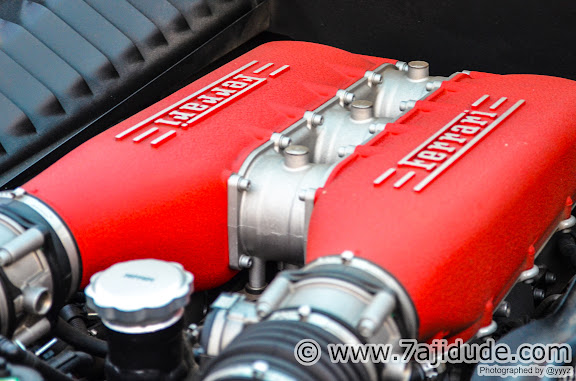
A couple of weeks ago I found a reason to use my Nikon D7000 to photograph quite an exquisite car! It was a Ferrari Italia 458 with Full carbon fiber interior, red seats.. Just Amazing (ما شاء الله ) . The car simply is a photographers dream, it was around 40 degrees, and the location wasn’t all that great, but it was an amazing car that was a pleasure to shoot!

 italia32.jpg

italia4.jpg

italia36.jpg

Btw: This car is offered for sale! If you’re seriously interested please call 

+965 99099988 (just tell him we’re calling min 6araf Yousef). 

For more photos check out the thumbnails below: 


[shashin type=”photo” id=”15060,15059,15058,15056,15049,15051,15023,15050,15040,15041,15042,15043,15032,15031,15031,15030,15029,15025,15026,15027,15037,15036,15034,15044,15048,15055,15054,15053,15052,15047″ size=”small” columns=”3″ order=”user” position=”center” crop=”y”]